Auxiliary displays, Show available, Info bars – LEICA Q3 Digital Camera User Manual
Page 176
PRACTICAL DEFAULT SETTINGS ▸ AUXILIARY DISPLAYS
176
AUXILIARY DISPLAYS
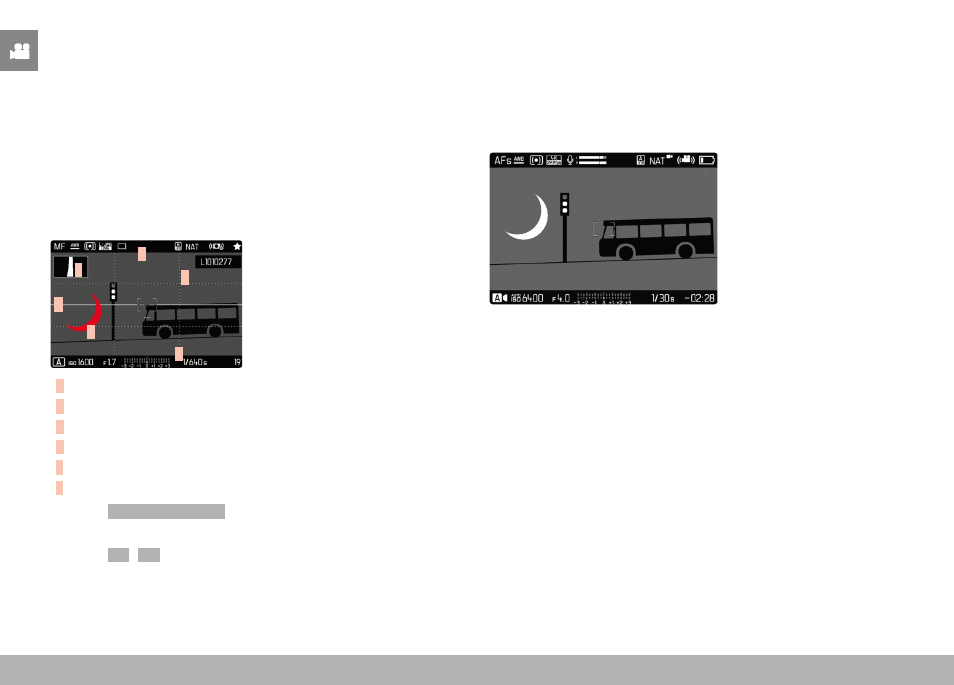
You can select a number of other displays in addition to the standard
information contained in the header and footer to adapt the screen
image to your needs. The following functions are available:
– Grid (only shooting mode, see p. 177)
– Focus Peaking (see p. 178)
– Zebra (see p. 177)
– Level Gauge (only shooting mode, see p. 179)
– Histogram (see p. 180)
E
A
A
B
D
C
A
Info Bars (= header and footer line)
B
Grid
C
Focus peaking
D
Zebra
E
Level gauge
F
Histogram
▸
Select
Capture Assistants
in the main menu
▸
Select the desired function
▸
Select
On
/
Off
Note
• All displays are visible at all times in video mode.
SHOW AVAILABLE
INFO BARS
The header and footer lines show the currently active settings and
exposure values. See chapter “Displays” for a full list of the various
displays (see p. 24).