Info displays in shooting mode, Show available, Info bars – LEICA Q3 Digital Camera User Manual
Page 86: Grid, Info displays in shooting mode show available, Info bars grid
PRACTICAL DEFAULT SETTINGS ▸ AUXILIARY DISPLAYS
86
INFO DISPLAYS IN SHOOTING MODE
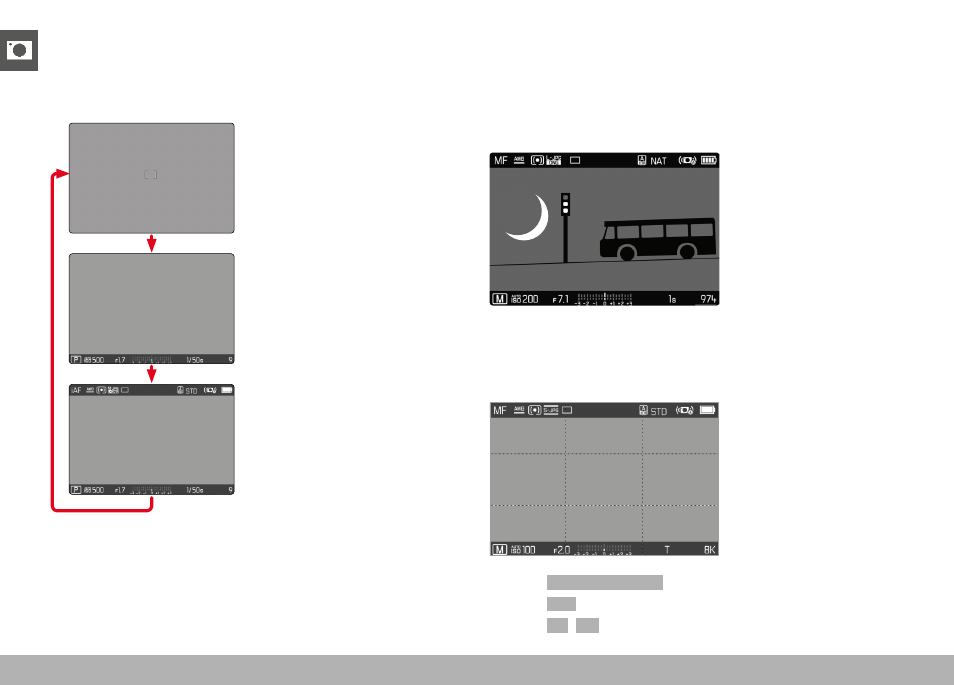
Select one of the three available display options.
▸
Press the center button
• The display cycles through the display options.
– No picture data
– Footer with exposure information,
auxiliary displays
– Header with recording information,
footer with exposure information,
auxiliary displays
Briefly showing/hiding information
▸
Tap and hold the shutter button
• (Only) the exposure information and currently active auxiliary
functions will be visible.
SHOW AVAILABLE
INFO BARS
The header and footer lines show the currently active settings and
exposure values. See chapter “Displays” for a full list of the various
displays (see p. 24).
GRID
The grids divide the image frame into multiple fields. They facilitate
pictorial composition and an exact camera orientation.
▸
Select
Capture Assistants
in the main menu
▸
Select
Grid
▸
Select
On
/
Off