Practical default settings, Touch af, Practical default settings ▸ touch af 174 – LEICA Q3 Digital Camera User Manual
Page 174: Select, If the metering method
PRACTICAL DEFAULT SETTINGS ▸ TOUCH AF
174
PRACTICAL DEFAULT SETTINGS
TOUCH AF
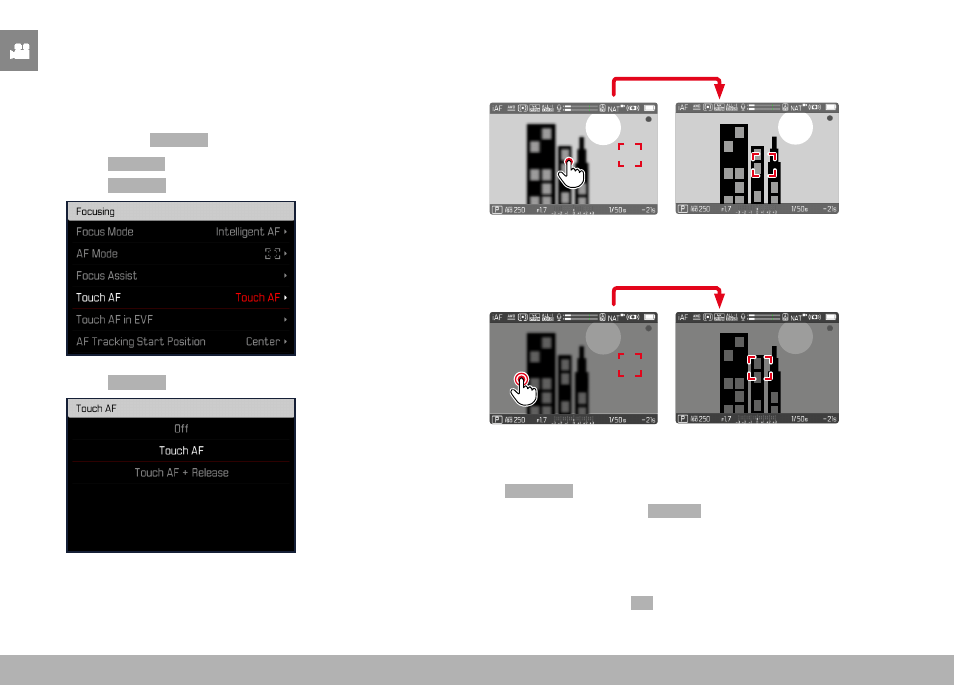
Touch AF allows a direct placement of the AF frame.
Factory setting:
Touch AF
▸
Select
Focusing
in the main menu
▸
Select
Touch AF
▸
Select
Touch AF
Positioning the AF frame
▸
Tap the LCD panel in the desired position
1/8000
2.8
F
12500
ISO
EV
-3 2
1 0
2
1
3+
8234
12
MP
Moving the focus frame back to the center of the screen
▸
Double-tap the LCD panel
1/8000
2.8
F
12500
ISO
EV
-3 2
1 0
2
1
3+
8234
12
MP
Notes
• This function is available with all AF metering methods except
Multi-Field
.
• If the metering method
Tracking
is selected, the focus frame will
remain at the selected position and autofocus commences when
the shutter button is tapped. For all other AF metering methods,
focusing occurs automatically.
• The position of the AF frame can only be reset with a double-tap,
even if the setting is
Off
.