Displaying multiple images at once – LEICA Q3 Digital Camera User Manual
Page 212
PLAYBACK MODE ▸ DISPLAYING MULTIPLE IMAGES AT ONCE
212
DISPLAYING MULTIPLE IMAGES AT ONCE
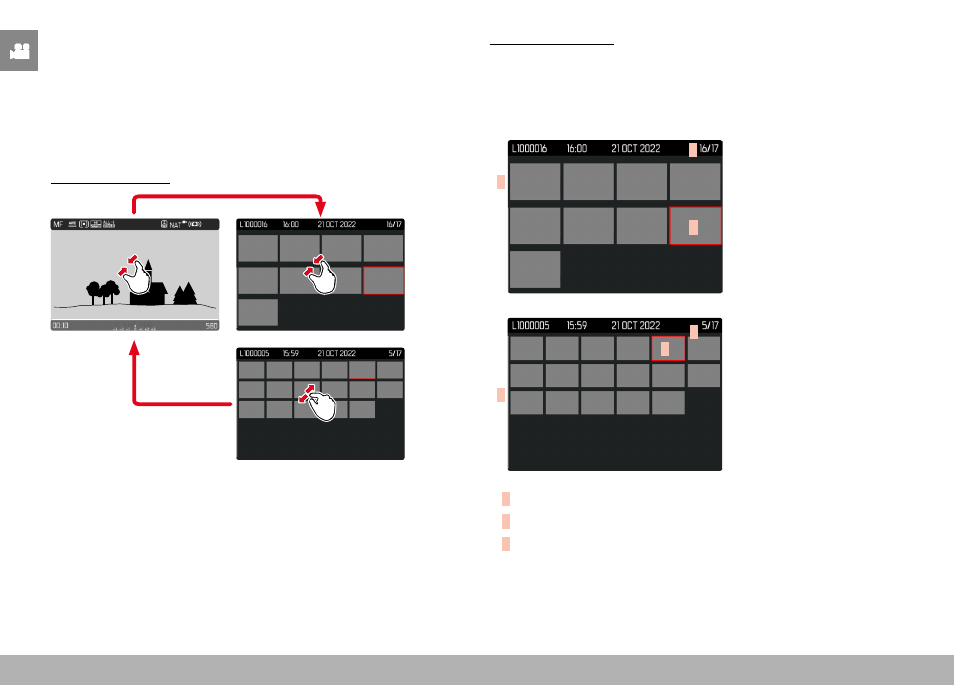
The camera offers an overview function in which several thumbnail
images can be viewed on one screen, which makes it easier to find
a specific image. You can choose 12 or 30 images per overview.
OVERVIEW
Using touch control
▸
Two-finger pinch
• The display toggles from 12 to 30 thumbnails.
Viewing other images
▸
Swipe up or down
Using button control
▸
Turn the thumbwheel to the left
• 12 thumbnails are shown at the same time. Another turn on
the thumbwheel increases the number of displayed thumbnails
to 30.
A
B
C
A
B
C
A
Currently selected image
B
Number of the currently selected images
C
Scrollbar
The currently viewed image is framed in red and can be selected for
a closer look.