Automatic optimization, Video stabilization, Dark area optimization (idr) – LEICA Q3 Digital Camera User Manual
Page 168: Dynamic range, Video stabilization dark area optimization (idr)
VIDEO SETTINGS ▸ AUTOMATIC OPTIMIZATION
168
AUTOMATIC OPTIMIZATION
VIDEO STABILIZATION
The stabilization function helps to reduce blurring for handheld
recordings.
Factory setting:
On
▸
Select
Optical Image Stabilization
in the main menu
▸
Select
On
/
Off
DARK AREA OPTIMIZATION (IDR)
DYNAMIC RANGE
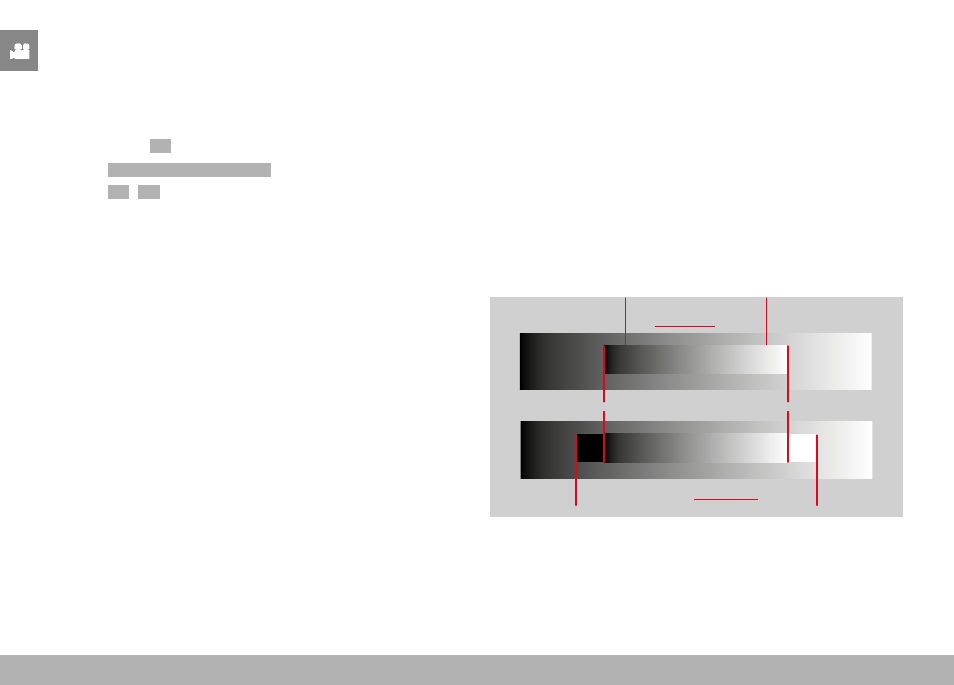
The contrast range of an object comprises all levels of brightness
from the brightest to the darkest point in the image. All levels of
brightness can be captured by the sensor, provided the contrast
range of the object is lower than the dynamic range of the camera.
In case of significant differences of brightness in the object (e.g.
shootings of interior spaces with bright windows in the background,
shootings with subject elements in shadow or directly lit by the sun,
landscapes with dark areas and a very bright sky), the camera with
its limited dynamic range will not be able to map the entire contrast
range of the object. Information in 'edge areas' will be lost (under
and overexposure).
Contrast range of
a low-contrast object
Contrast range of a high-contrast object
Dynamic range of the camera
Underexposure
Overexposure