Playback mode, Control elements in playback mode – LEICA Q3 Digital Camera User Manual
Page 208
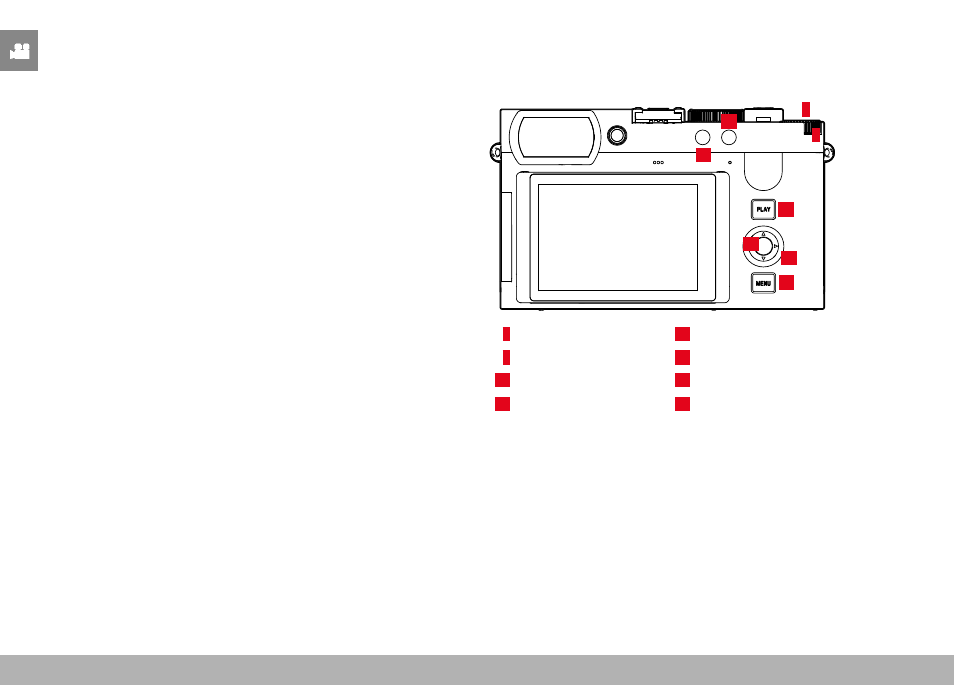
PLAYBACK MODE ▸ CONTROL ELEMENTS IN PLAYBACK MODE
208
PLAYBACK MODE
Playback mode is used to display and manage the stored recordings.
The switchover between shooting and playback mode, as well as most
other actions can be completed using gesture or key control. Please
see p. 45 for more information about the available gestures.
Notes
• Recorded videos are not automatically rotated in playback mode
to utilize the full screen area.
• It may not be possible to render files with this camera that were
not recorded with this device.
• In some cases, the screen image may not have the expected
quality, or the LCD panel will remain blank and only display the
file name.
• You can toggle back from playback mode to shooting mode at
any time by tapping the shutter button.
• Video recordings cannot be enlarged.
CONTROL ELEMENTS IN PLAYBACK MODE
CONTROL ELEMENTS ON THE CAMERA
18
14
21
13
20
19
4
5
4
Thumbwheel
18
PLAY
button
5
Thumbwheel button
19
Center button
13
FN button 1
20
Directional pad
14
FN button 2
21
MENU
button