Recording video, Start/exit video mode – LEICA Q3 Digital Camera User Manual
Page 182
RECORDING VIDEO ▸ START/EXIT VIDEO MODE
182
RECORDING VIDEO
The settings described in this chapter only apply for video opera-
tions. They are therefore part of the video menu and must always
be accessed and configured from within video mode (see chapter
“Camera operation” in the section “Menu Control”). Any menu
items of the same name in the photo menu are not affected.
Notes
• You can record up to 29 minutes of uninterrupted video.
• Some menu items are unavailable in Video mode. The text in
the relevant line is displayed in gray to signify the existence of a
submenu.
• As only part of the sensor area is used in video recordings, the
relevantly effective focal length is increased, which slightly re-
duces the size of the image sections.
• The screen image of video recordings with the Leica Q3 appears
with corresponding frame depending on the selected resolution
and aspect ratio.
• The automatic LCD panel and EVF shutdown will also deactivate
the AF system (see p. 68). We therefore recommend the
Off
setting if autofocus is to be used in HDMI recordings.
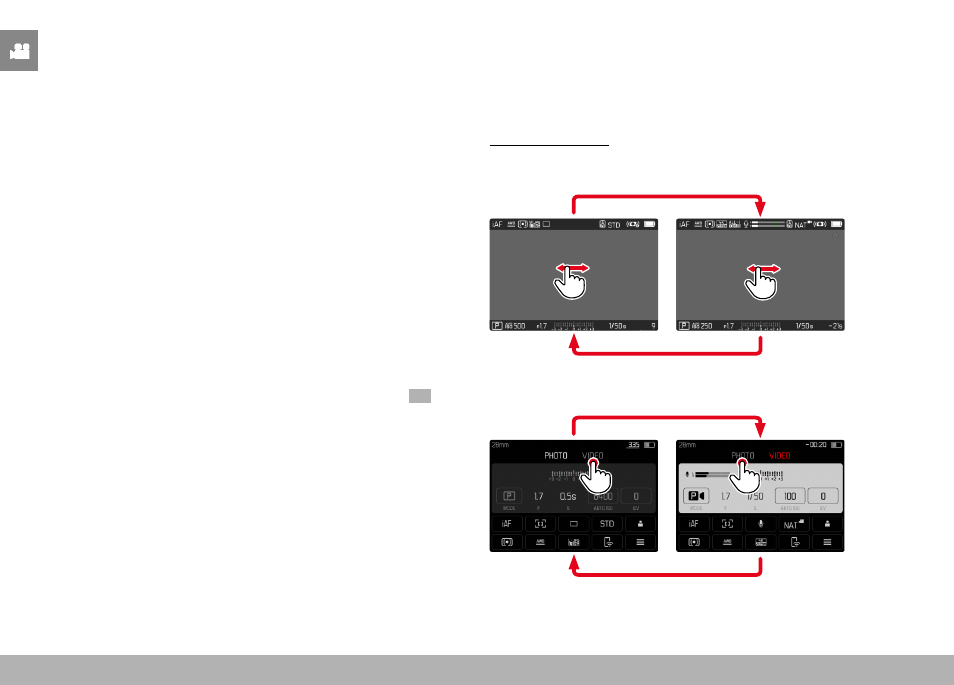
START/EXIT VIDEO MODE
The camera will always be in Photo mode at initial activation or
after a reset to factory settings. There are two methods for toggling
between Photo and Video mode:
Using touch control
Variant 1
Video
Photo
Variant 2
Video
Photo
• The color of the status screen changes accordingly.