Exposure bracketing – LEICA Q3 Digital Camera User Manual
Page 123
PHOTOGRAPHY ▸ SHOOTING MODES
123
EXPOSURE BRACKETING
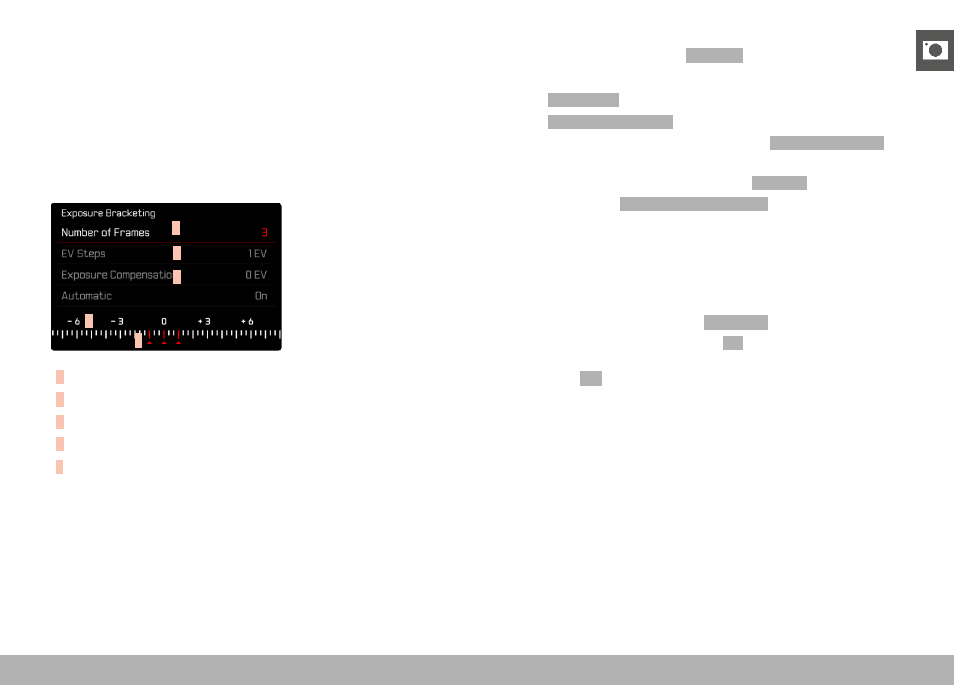
Many attractive objects are rich in contrast, which means they have
very bright and very dark areas. The image effect can be dramatically
different, depending on which of these areas you choose to align your
exposure with. The automatic bracketing function in aperture-prior-
ity mode allows you to produce several alternatives with graduated
exposure values and varying shutter speeds. You can then select the
image you like best or use relevant photo editing software to calcu-
late an image with a particularly broad contrast spectrum (HDR).
A
B
C
D
E
A
Number of frames
B
Exposure difference between shots
C
Exposure compensation
D
Light value scale
E
Exposure values of the images marked in red
(The scale will be offset by the relevant value if exposure
compensation is set concurrently.)
You can select the desired number of frames (3 or 5). The exposure
difference, which can be set via
EV Steps
, can be up to 3 EV.
▸
Select
Drive Mode
in the main menu
▸
Select
Exposure Bracketing
▸
Select the desired number of frames under
Number of Frames
in
the submenu
▸
Select the desired exposure offset under
EV steps
in the submenu
▸
Select the desired
Exposure Compensation
value in the submenu
• The marked exposure values change positions according to the
settings selected. In the case of exposure compensation, the
scale also shifts.
• The selected exposure compensation value will be applied to
the entire series of shots.
▸
Select the desired setting under
Automatic
in the submenu
• With the factory setting in place (
On
), the entire exposure se-
ries will run after the shutter button is pressed once; when the
setting is
Off
, each picture must be taken individually.
▸
Take one or several shots by pressing the shutter button