Exposure modes – LEICA Q3 Digital Camera User Manual
Page 200
RECORDING VIDEO ▸ EXPOSURE
200
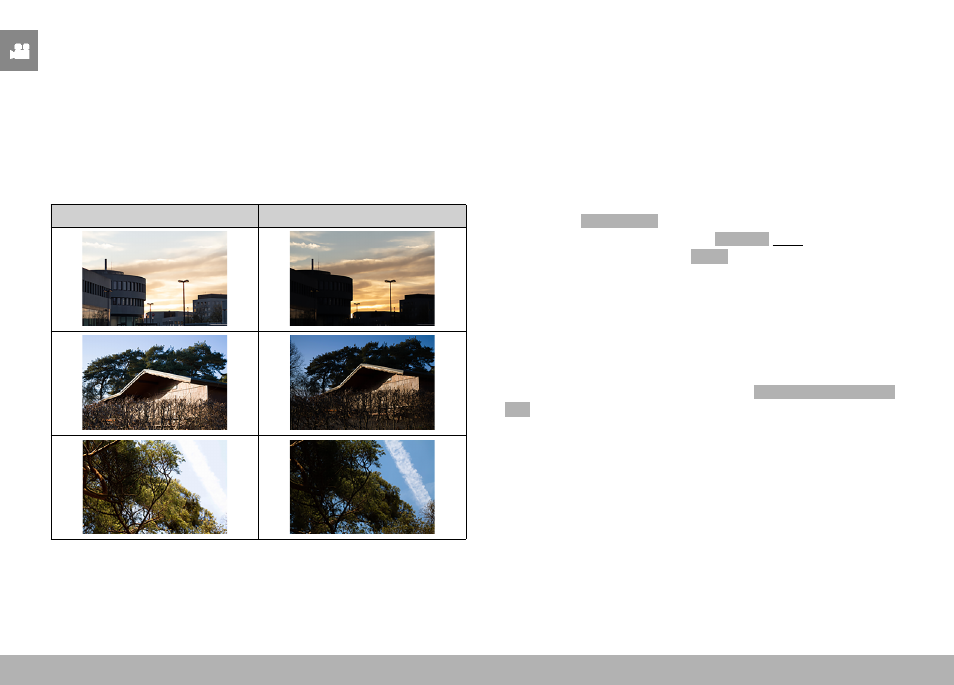
HIGHLIGHT-WEIGHTED
This method considers the entire image field. The exposure value
will, however, be adjusted to very bright subject elements. That pre-
vents the overexposure of bright subject elements without having
to measure them individually. This metering method is particularly
useful for objects that are significantly more brightly lit than the
rest of the frame (e.g. people in a spotlight), or that reflect the light
significantly (e.g. white clothing).
Multi-field
Highlight-weighted
EXPOSURE MODES
You can choose one of four video shooting modes:
– Program AE mode (
P
)
– Aperture-priority mode (
A
)
– Shutter-priority mode (
S
)
– Manual setting (
M
)
These four “classic” modes are accessed via a relevant setting of
the shutter-speed dial and the aperture ring. A correct setting for
the menu item
Scene Mode
(see p. 206) is prerequisite for the
use of
P
,
A
,
S
and
M
. The menu item
P-A-S-M
must be selected.
Where the fully automated mode
AUTO
is selected instead, then
that setting takes precedence over settings on the physical control
elements. The shutter-speed dial and the aperture ring will in that
case have no assigned function.
Notes
• The following applies for all exposure modes: the available shutter
speeds for custom settings or those available for automatic set-
tings depend on the selected frame rate (
Video Format / Resolu-
tion
, see p. 156).