Lcd panel (touch screen) – LEICA Q3 Digital Camera User Manual
Page 45
CAMERA OPERATION ▸ CONTROL ELEMENTS
45
LCD PANEL (TOUCH SCREEN)
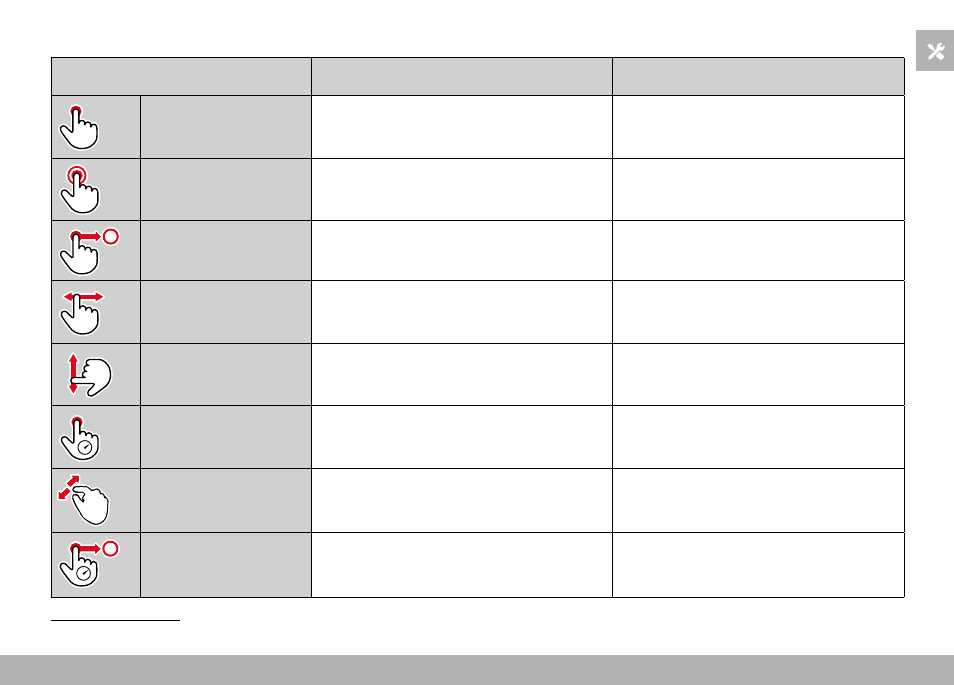
TOUCH CONTROL*
In shooting mode
In review mode
“tap”
Shifting the AF frame and focusing
(while Touch AF is activated)
Selecting images
“double tap”
Resetting the AF frame
Enlarging/reducing viewed images
“swipe”
Scrolling through the gallery
Shifts the enlarged image section
“horizontal swipe”
(full length)
Mode change (photo/video)
Scrolling through the gallery
“vertical swipe”
(full length)
Switching to review mode
Switching to shooting mode
“tap and hold”
Accessing the AF Quick Setting
“two-finger pinch”
“two-finger spread”
Changing the size of the AF frame
(in specific AF modes)
Enlarging/reducing viewed images
“swipe and hold”
“hold and swipe”
Continuous scrolling
* A light touch is enough, don't apply pressure.