LEICA Q3 Digital Camera User Manual
Page 167
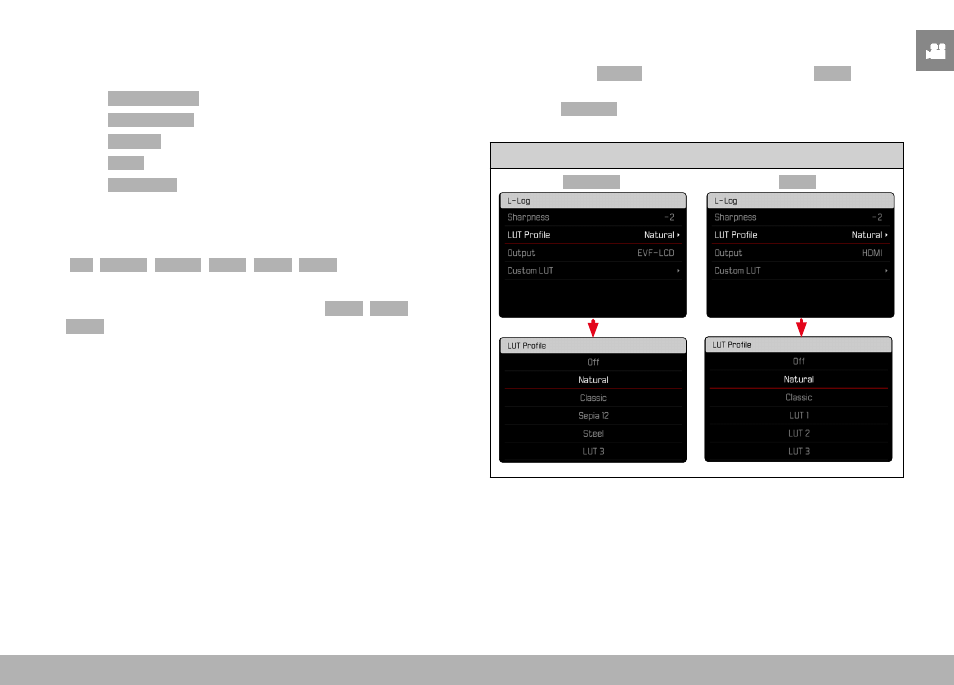
VIDEO SETTINGS ▸ VIDEO GAMMA
167
SELECTING THE LUT PROFILE
In addition to the two pre-configured LUT profiles, three more mem-
ory slots are available for custom LUT profiles.
▸
Select
Video Settings
in the main menu
▸
Select
Video Gamma
▸
Select
Settings
▸
Select
L-Log
▸
Select
LUT Profile
• The list of profiles available for the active output channel
appears.
▸
Select the desired setting
(
Off
,
Natural
,
Classic
,
LUT 1
,
LUT 2
,
LUT 3
)
Note
• Unused memory slots appear in the list as
LUT 1
,
LUT 2
, and
LUT 3
. A memory slot filled with a custom LUT profile will display
its name instead.
The list of selectable LUT profiles depends on the currently selected
output channel (camera/HDMI). The channel is displayed next
to the menu item
Output
. When the channel is set to
HDMI
, the
selection list will display the profiles available for HDMI output.
The setting
EVF-LCD
will therefore show the profiles available for
camera display.
Active output channel
EVF-LCD
HDMI