Switching menu sections – LEICA Q3 Digital Camera User Manual
Page 48
Advertising
CAMERA OPERATION ▸ MENU CONTROL
48
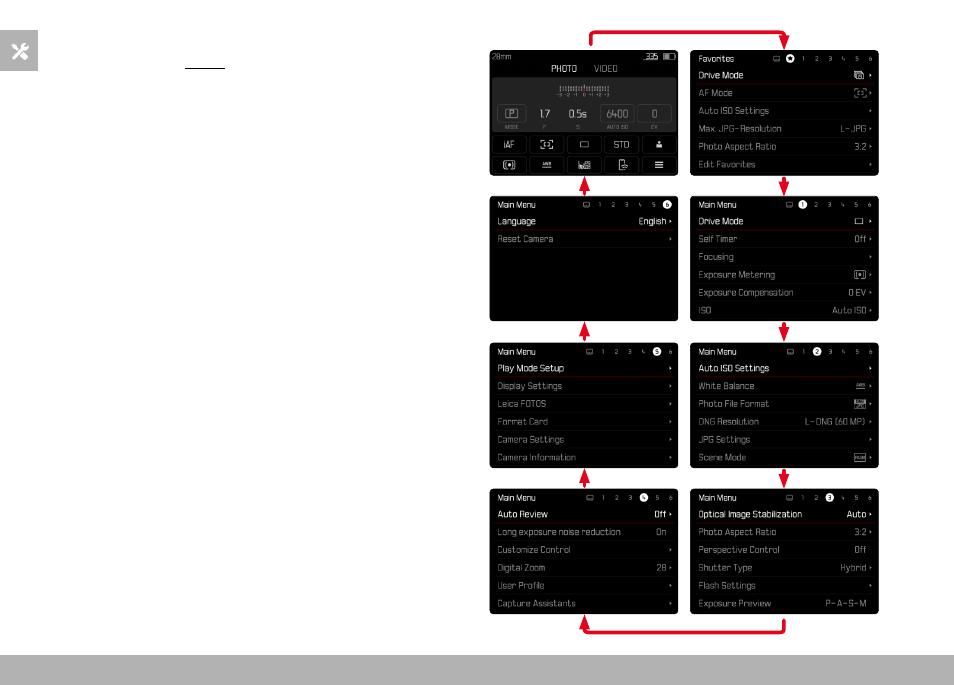
SWITCHING MENU SECTIONS
The status screen will always be displayed as the first menu section.
The top level of the menu is organized into “pages”, which are dis-
played in the header line: Status screen, poss. Favorites menu (up
to 2 pages), and several sections of the Main menu. You can switch
between menu sections by scrolling through the pages. Alterna-
tively, the status screen and the favorites menu offer access to the
main menu as their respectively last menu item.
Scrolling forward
▸
Press the
MENU
button
• The status screen will appear again after the last page of the
main menu.
Scrolling backward
▸
Press the directional pad left
• In reverse order, you can only browse back to the status
screen.
Advertising