Shutter-speed dial, Thumbwheel – LEICA Q3 Digital Camera User Manual
Page 40
Advertising
CAMERA OPERATION ▸ CONTROL ELEMENTS
40
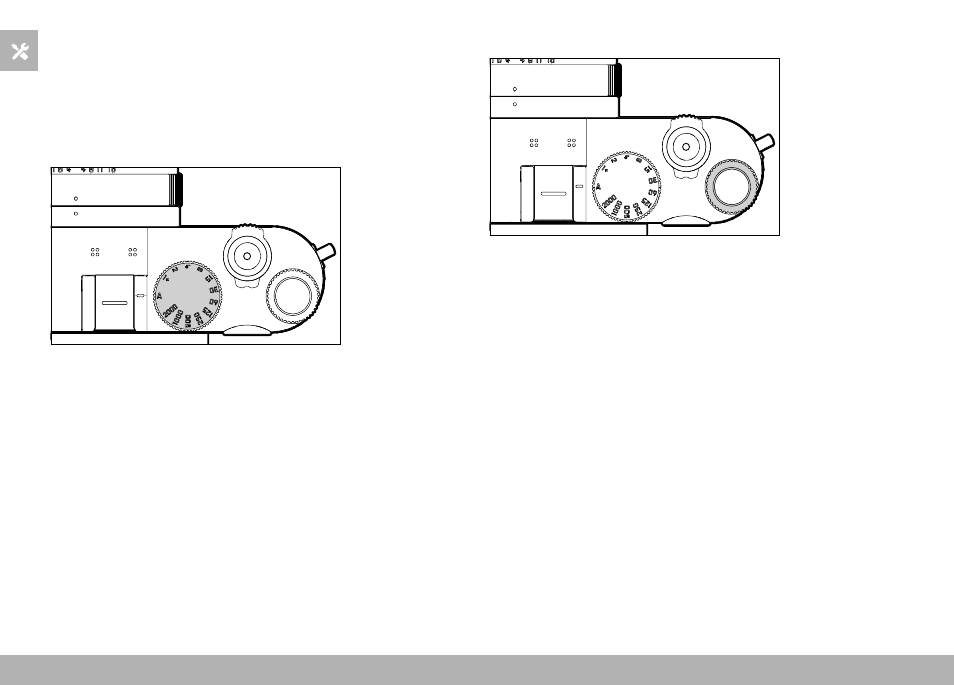
SHUTTER-SPEED DIAL
The shutter-speed dial has no stop, which means it can be turned
in either direction from any position. It will click at each engraved
position and for intermediate values. Intermediate positions outside
the click positions must not be used. Please read the section “Ex-
posure” (see p. 107 and 199) for details about correct exposure
settings.
–
A
: aperture-priority mode
(Automatic shutter speed control)
–
2000
-
1+
: Fixed shutter speeds
THUMBWHEEL
– Menu navigation
– Exposure compensation value selection
– Setting the ISO value
– Enlarging/reducing viewed images
– Setting selected menu items/functions
– Setting the program shift
Advertising