Manual exposure setting – m, Setting shutter speeds, Manual exposure setting – m setting shutter speeds – LEICA Q3 Digital Camera User Manual
Page 203
RECORDING VIDEO ▸ EXPOSURE
203
MANUAL EXPOSURE SETTING – M
The following manual settings for shutter speed and aperture are a
good choice:
– to maintain constant exposure settings between multiple recordings
– to maintain constant exposure settings while recording, specifically
in conjunction with fixed ISO settings
▸
Select
Scene Mode
in the main menu
▸
Select
P-A-S-M
▸
Set the desired exposure manually (using the shutter-speed dial
and the aperture ring of the lens).
• The exposure compensation is done using the scale of the light
balance.
▸
Start video recording
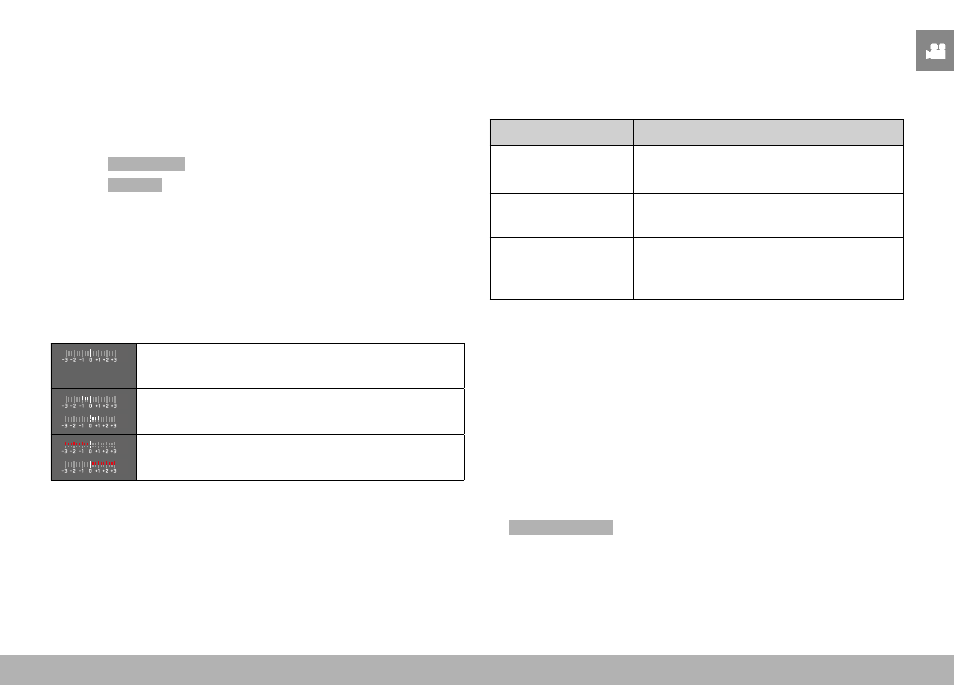
Displays on the light balance:
Correct exposure
Underexposure or overexposure by the displayed
value
Under or overexposure by more than 3 EV
Notes
• The shutter-speed dial must be clicked to one of the engraved
exposure shutter speeds.
SETTING SHUTTER SPEEDS
The shutter speed is set in two steps.
using the shutter-speed dial: in full increments
using the thumbwheel: fine tuning in 1⁄3 increments
Shutter-speed dial Thumbwheel
All settings from
2
to
1000
Fine tuning the shutter speed in 1⁄3 EV
increments, max. ±2⁄3 EV
Set to
1+
Longer shutter speeds than 1 s (0.6 s to
120 s in 1⁄3 EV increments)
Set to
2000
Shorter shutter speeds than 1⁄1000 s
(1⁄1250 s to 1⁄16000 s in 1⁄3 EV incre-
ments)
EXAMPLES FOR SHUTTER SPEED FINE TUNING SETTINGS
– set shutter speed 1⁄125 s + move the thumbwheel one click to
the left = 1⁄100 s
– set shutter speed 1⁄500 s + move the thumbwheel two clicks to
the right = 1⁄800 s
Notes
• Fine tuning can alternatively be done via the status screen.
Depending on the thumbwheel assignment, this may be the only
option (see p. 60).
• The max. available shutter speed is limited by the set frame rate
(
Video Resolution
).