H3C Technologies H3C SecPath F1000-E User Manual
Page 353
# Define rules for ACL 3102.
•
Click the icon of ACL 3102 in the ACL list page, and then click Add.
•
Select Permit for Operation.
•
Select IP for Protocol.
•
Click Apply.
Step3
Configure policy aaa.
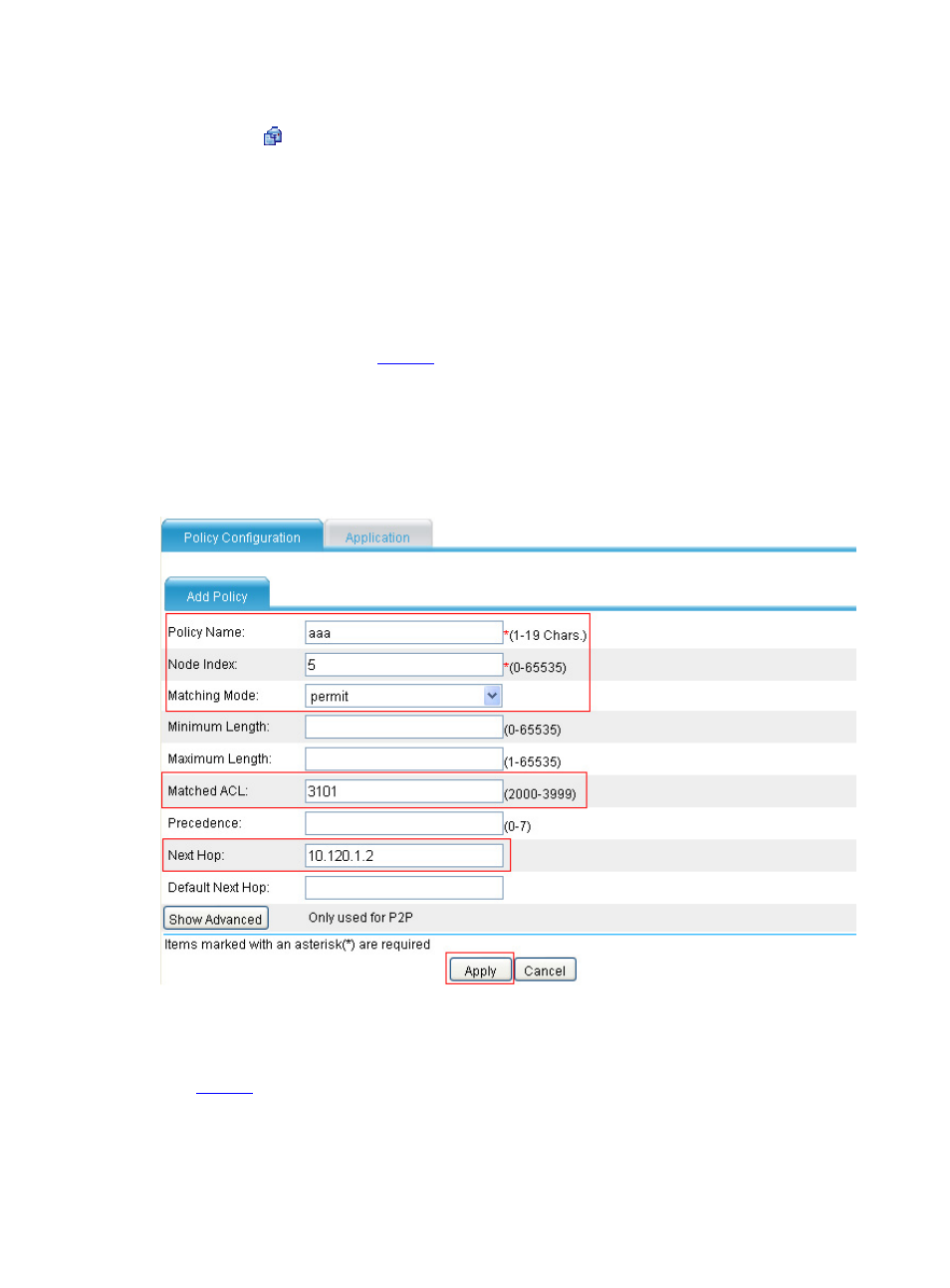
# Add node 5 to policy aaa.
•
Select Network > Routing Management > Policy Routing from the navigation tree to
enter the default policy configuration page. Then click Add and perform the following
configuration as shown in
.
•
Type aaa as the policy name and 5 as node index, and set the mode to permit.
•
Type 3101 as the number of the ACL for matching TCP packets.
•
Type 10.120.1.2 as the next hot.
•
Click Apply.
Figure 8 Add node 5 to policy aaa
# Add node 10 to policy aaa.
•
Click Add on the policy configuration page and perform the following configuration as shown in
.
•
Type aaa as the policy name and 10 as node index, and set the mode to deny.
•
Type 3102 as the number of the ACL for matching all IP packets.
•
Click Apply.