H3C Technologies H3C SecPath F1000-E User Manual
Page 424
16
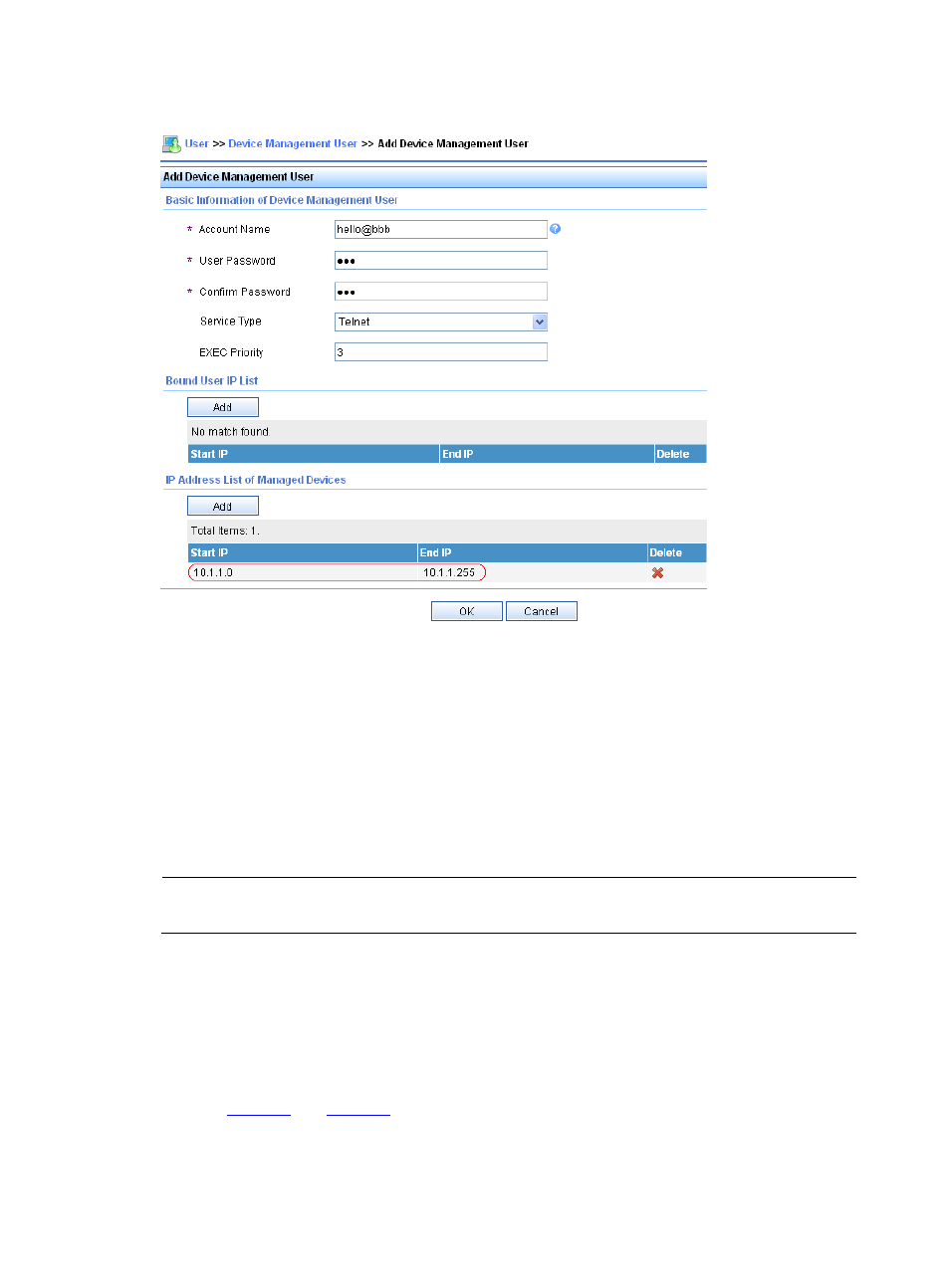
Figure 11 Add an account for device management
•
Add a user named hello@bbb
•
Specify the password as abc and confirm the password
•
Select Telnet as the service type
•
Set the EXEC privilege level to 3. This value identifies the privilege level of the Telnet user after login,
which is 0 by default.
•
Click Add in the IP address list of managed devices, and then specify the IP address range of the
hosts to be managed as 10.1.1.0 to 10.1.1.255
•
Click OK to finish the operation.
NOTE:
The IP address range of the hosts to be managed must contain the IP address of the access device added.
Step2
Configure the device
# Configure the IP address and security zone of each interface. (Omitted)
# Configure the RADIUS authentication and accounting servers.
From the navigation tree, select User > RADIUS > Server Configuration. Perform the configurations
shown in
.