H3C Technologies H3C SecPath F1000-E User Manual
Page 606
Advertising
14
•
Set the start time to 8:00.
•
Set the end time to 18:00.
•
Select the Mon., Tues., Wed., Thurs., and Fri., check boxes.
•
Click Apply.
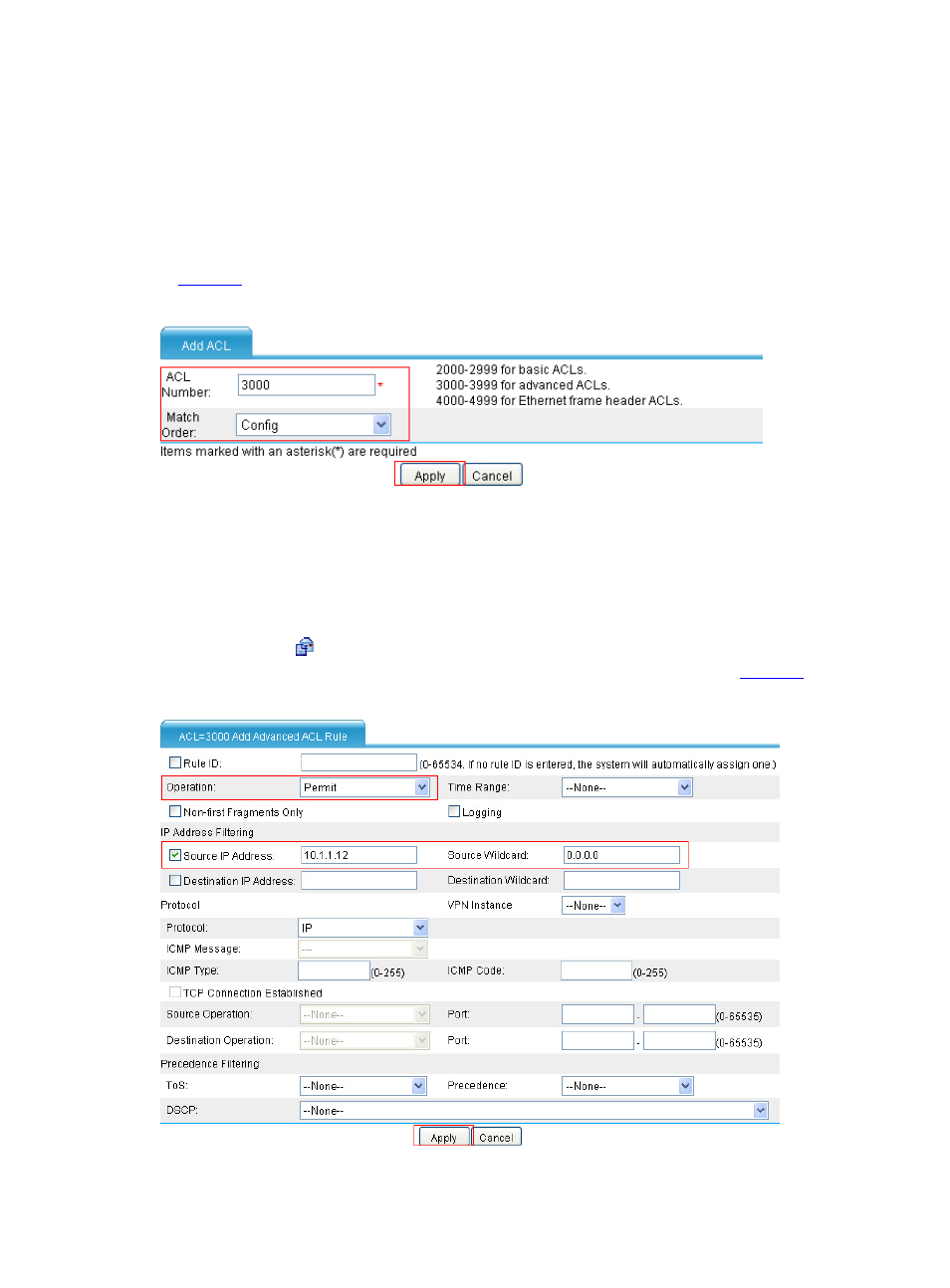
# Create ACL 3000.
Select Firewall > ACL from the navigation tree, and then click Add. Perform the configurations shown
in
.
Figure 17 Configure ACL 3000
•
Type 3000 in the ACL Number text box.
•
Select Config as the match order.
•
Click Apply.
# Configure a rule for ACL 3000, allowing host public to access the external network at any time.
•
Click the icon of ACL 3000 to enter the page that lists the ACL rules. Click Add to enter the
page for configuring a rule for ACL 3000. Perform the configurations shown in
.
Figure 18 Allow the host Public to access the external network at any time
Advertising
This manual is related to the following products: