H3C Technologies H3C SecPath F1000-E User Manual
Page 693
23
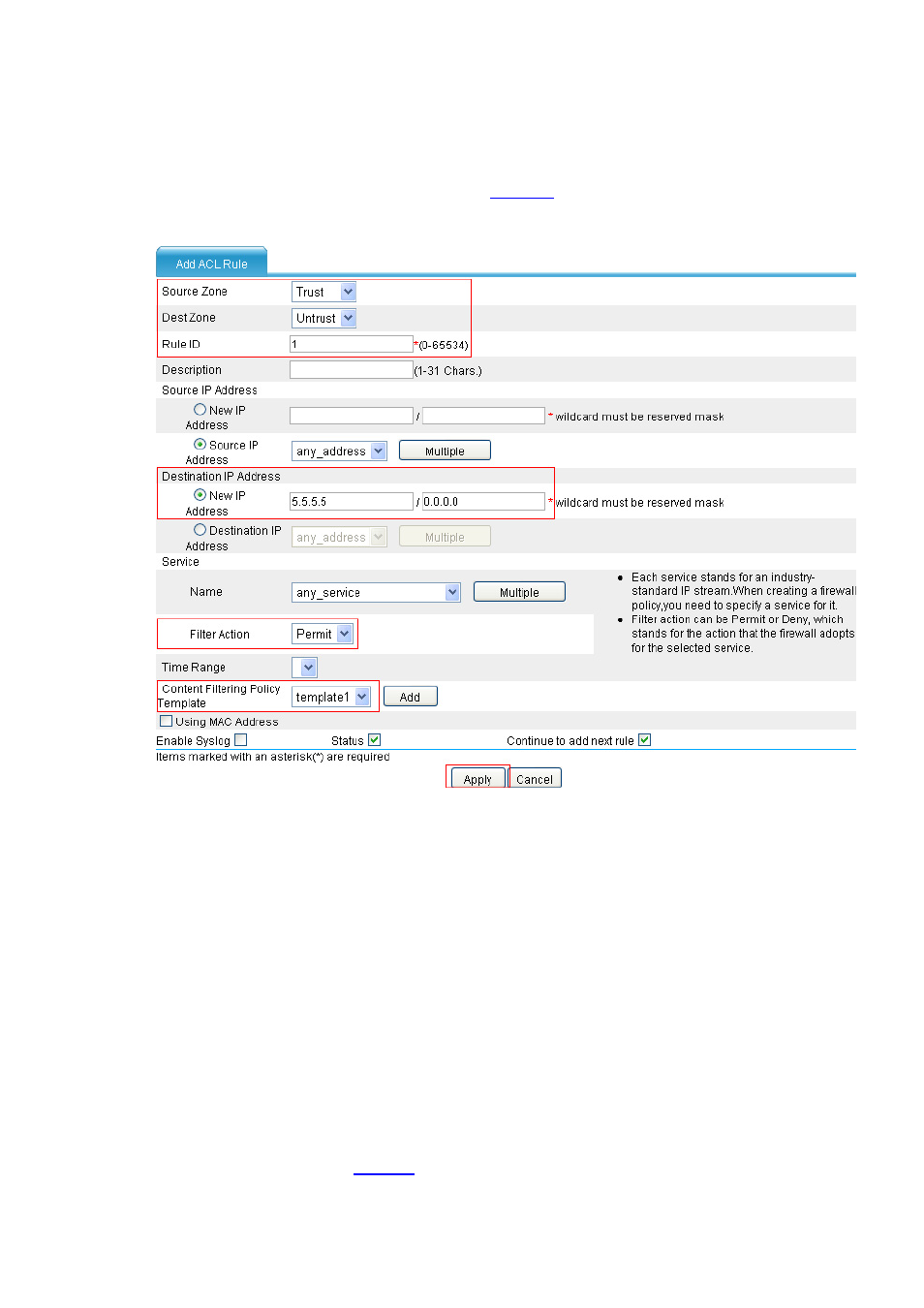
# Configure an interzone policy for traffic from security zone Trust to destination 5.5.5.5 in security zone
Untrust, referencing the content filtering policy template without Java applet blocking.
•
Select Firewall > Security Policy > Interzone Policy from the navigation tree, and then click
Add to perform the configurations shown in
.
Figure 30 Configure the interzone policy referencing the template without Java applet blocking
•
Select Trust as the source zone.
•
Select Untrust as the destination zone.
•
Type 1 in the Rule ID text box.
•
In the Destination IP Address area, select the radio button before New IP Address and then
type destination IP address 5.5.5.5/0.0.0.0.
•
Select Permit as the filter action.
•
Select content filtering policy template template1.
•
Click Apply.
# Configure an interzone policy for traffic from security zone Trust to security zone Untrust, referencing the
content filtering policy template with Java applet blocking.
•
Select Trust as the source zone and Untrust as the destination zone, and configure the
configurations shown in
.