N in, Figure 21 – H3C Technologies H3C SecPath F1000-E User Manual
Page 476
13
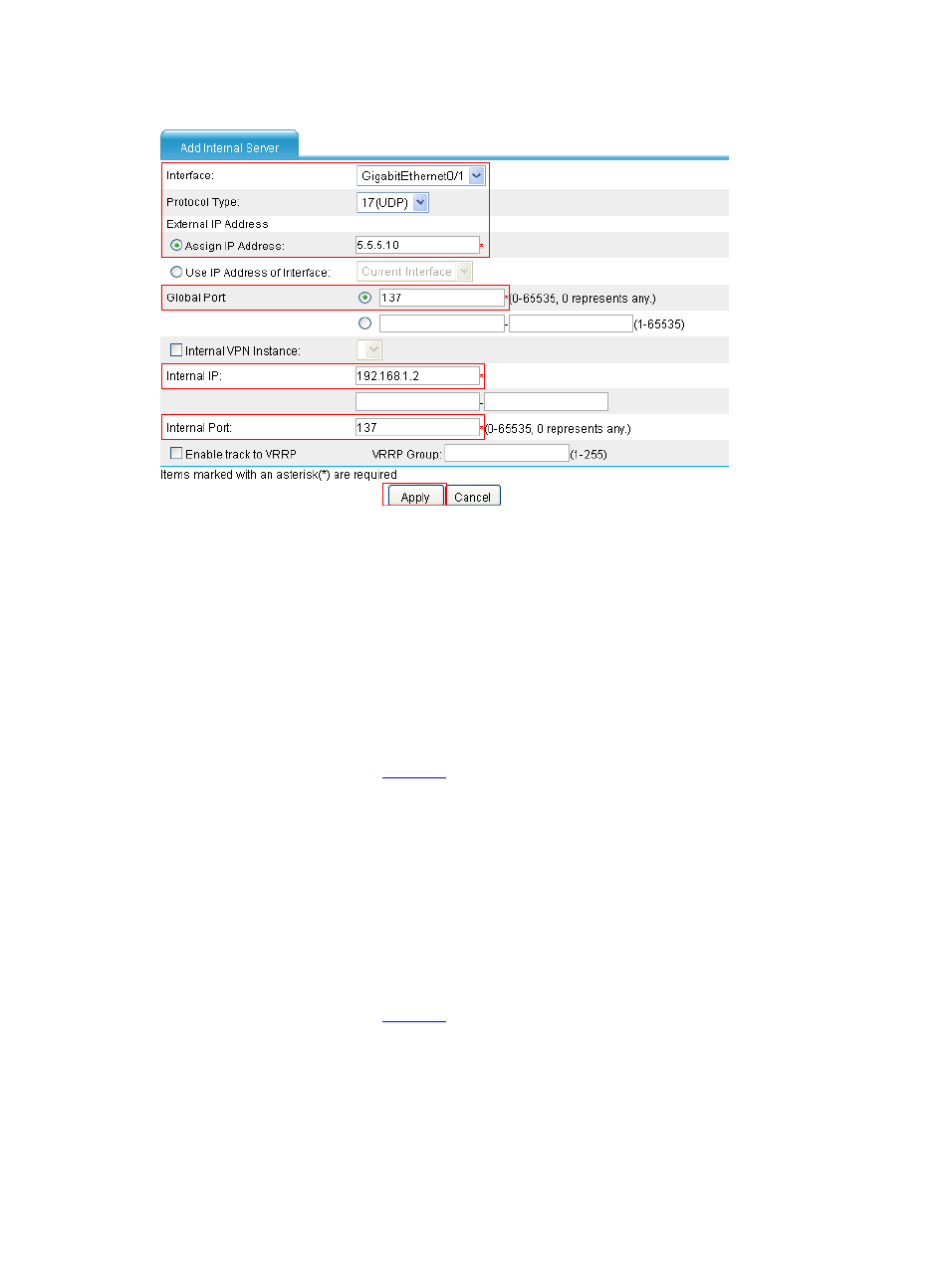
Figure 21 Configure an internal WINS server
•
Select GigabitEthernet0/1.
•
Select 17(UDP) as the protocol type,
•
Type 5.5.5.10 as the external IP address.
•
Type 137 as the global port.
•
Type 192.168.1.2 as the internal IP address.
•
Type 137 as the internal port.
•
Click Apply.
•
In the Internal Server area, click Add. Configure an interval WINS server, which is similar to
the configuration shown in
.
•
Select GigabitEthernet0/1.
•
Select 17(UDP) as the protocol type,
•
Type 5.5.5.10 as the external IP address.
•
Type 138 as the global port.
•
Type 192.168.1.2 as the internal IP address.
•
Type 138 as the internal port.
•
Click Apply.
•
In the Internal Server area, click Add. Configure an interval WINS server, which is similar to
the configuration shown in
.
•
Select GigabitEthernet0/1.
•
Select 6(TCP) as the protocol type.
•
Type 5.5.5.10 as the external IP address.
•
Type 139 as the global port.
•
Type 192.168.1.2 as the internal IP address.