H3C Technologies H3C SecPath F1000-E User Manual
Page 469
Advertising
6
•
Type 5.5.5.9 as the start IP address.
•
Type 5.5.5.11 as the end IP address.
•
Click Apply.
# Configure dynamic NAT.
•
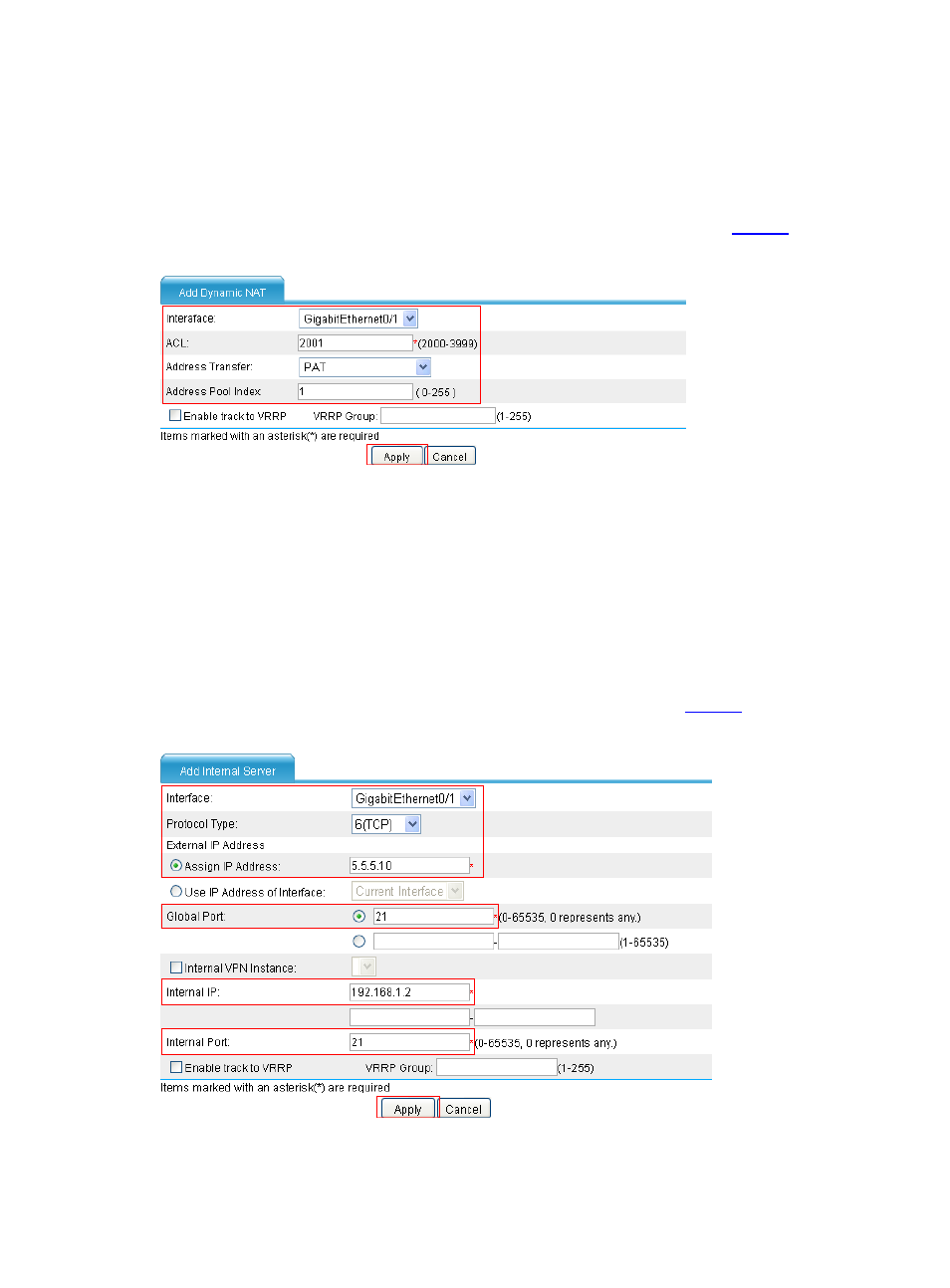
In the Dynamic NAT area, click Add. Configure dynamic NAT as shown in
.
Figure 8 Configure dynamic NAT
•
Select GigabitEthernet0/1.
•
Type 2001 for the ACL field.
•
Select PAT as the address translation.
•
Type 1 as the address pool index.
•
Click Apply.
# Configure the internal FTP server.
•
Select Firewall > NAT > Internal Server from the navigation tree. Then in the Internal
Server area, click Add. Configure an internal FTP server as shown in
.
Figure 9 Configure an internal FTP server
•
Select GigabitEthernet0/1.
Advertising
This manual is related to the following products: