Nbt alg configuration example, Network requirements – H3C Technologies H3C SecPath F1000-E User Manual
Page 473
10
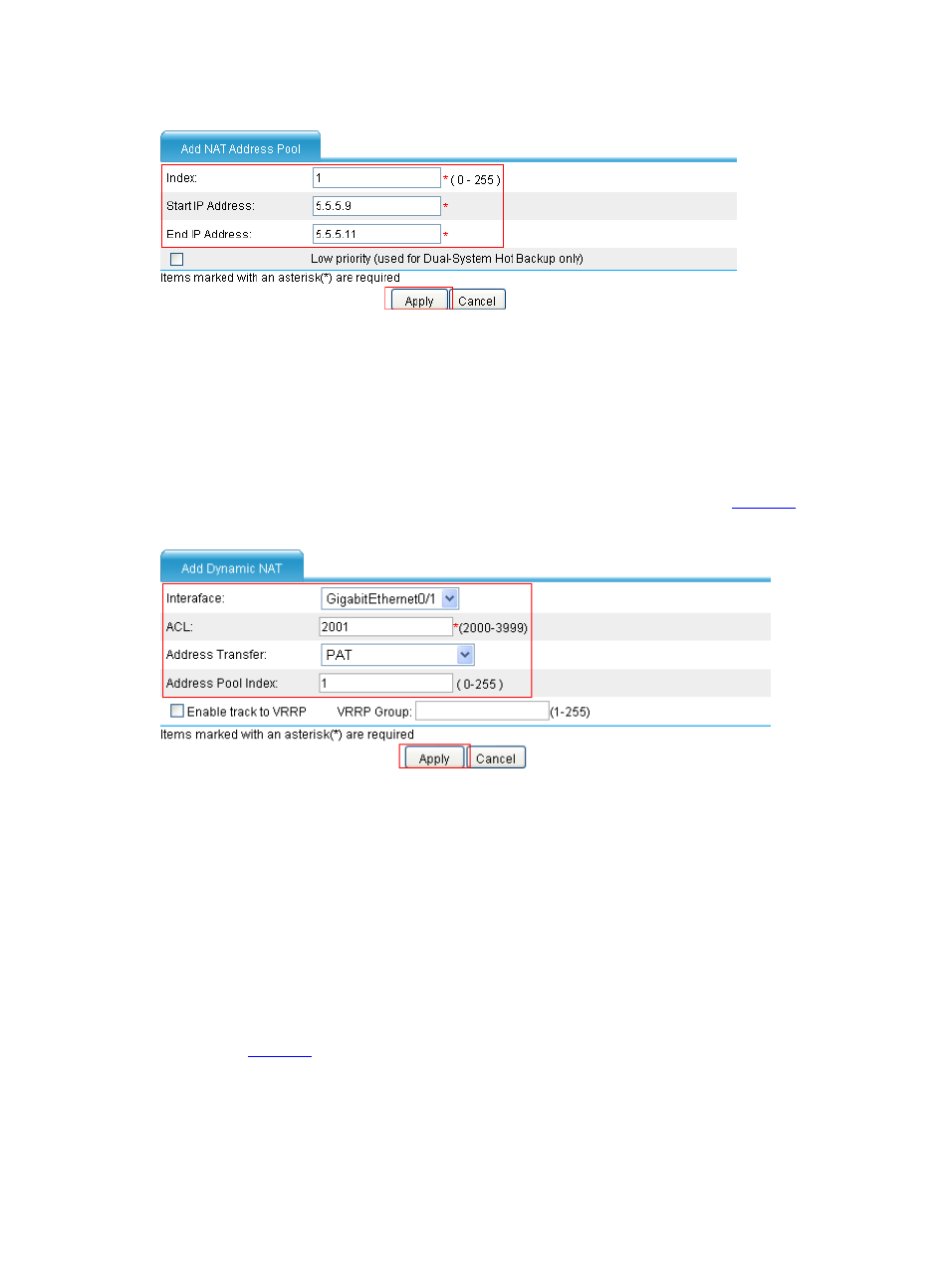
Figure 15 Configure a NAT address pool
•
Type 1 in the Index text box.
•
Type 5.5.5.9 as the start IP address.
•
Type 5.5.5.11 as the end IP address.
•
Click Apply.
# Configure dynamic NAT.
•
In the Dynamic NAT area, click Add. Configure dynamic NAT as shown in
.
Figure 16 Configure dynamic NAT
•
Select GigabitEthernet0/1.
•
Type 2001 for the ACL field.
•
Select PAT as the address translation.
•
Type 1 as the address pool index.
•
Click Apply.
NBT ALG Configuration Example
Network requirements
As shown in
, a company accesses the Internet through a device with NAT and ALG enabled.
The company provides NBT services to the outside. The inside network segment of the company is
192.168.1.0/24. You need to configure NAT and ALG to meet the following requirements:
•
Host B can access the WINS server and Host A with host names.
•
Host A uses 5.5.5.9 as its external IP address, and the WINS server uses 5.5.5.10 as its external IP
address.