H3C Technologies H3C SecPath F1000-E User Manual
Page 731
19
•
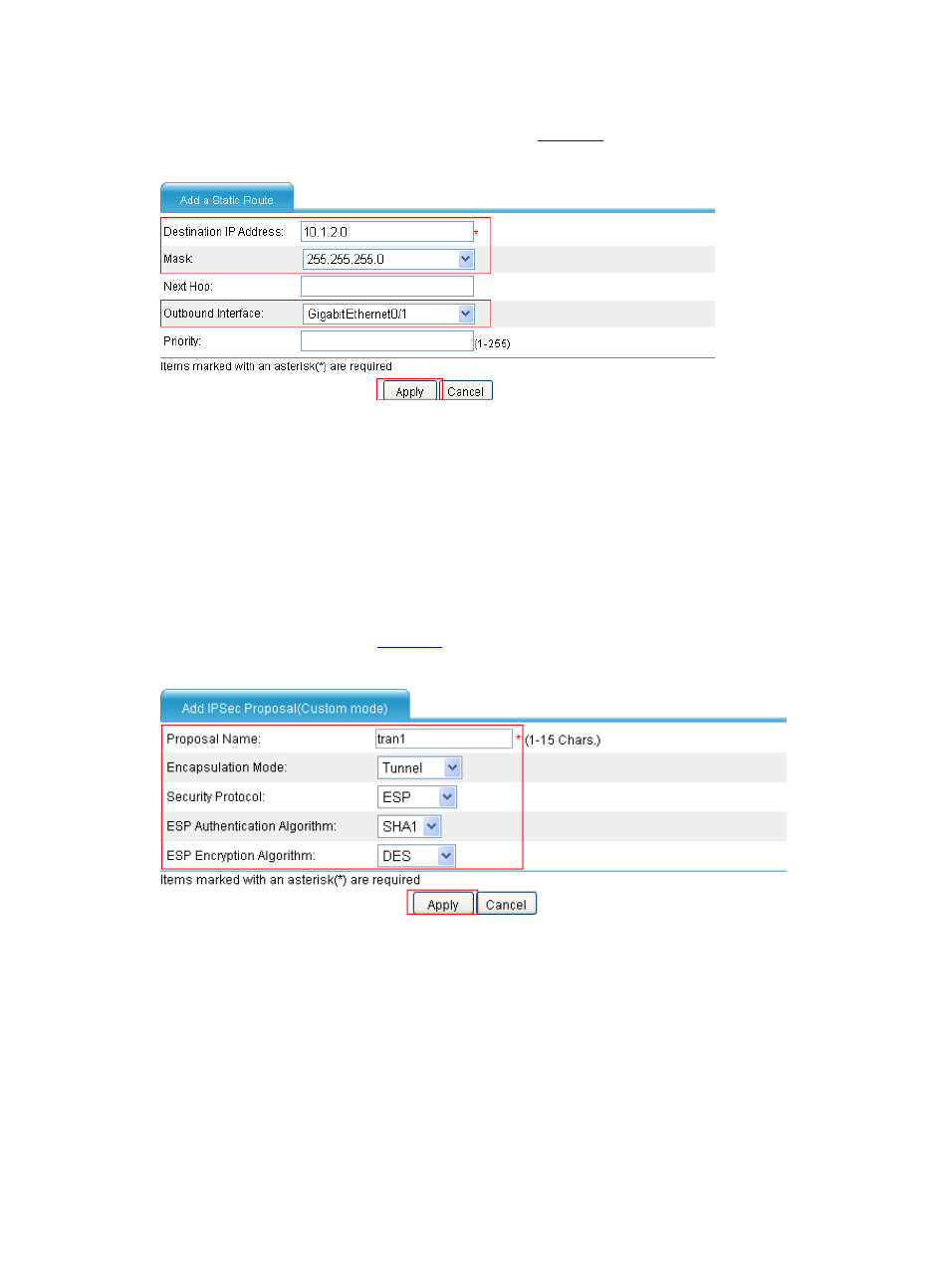
Select Network > Routing Management > Static Routing from the navigation tree, and
then click Add. Create a static route as shown in
.
Figure 25 Configure a static route to Host B
•
Type 10.1.2.0 as the destination IP address.
•
Type 255.255.255.0 as the mask.
•
Select GigabitEthernet0/1 as the outbound interface.
•
Click Apply.
# Configure an IPsec proposal named tran1, and make configuration as follows.
•
Select VPN > IPSec > Proposal from the navigation tree and then click Add.
•
Select Custom mode from the IPSec Proposal Configuration Wizard page. Make the
configuration as shown in
.
Figure 26 Configure IPsec proposal tran1
•
Type tran1 as the name of the IPsec proposal.
•
Select Tunnel as the packet encapsulation mode.
•
Select ESP as the security protocol.
•
Select SHA1 as the ESP authentication algorithm.
•
Select DES as the ESP encryption algorithm.
•
Click Apply.
# Configure the IKE peer.