Configuration verification, N in, Figure 55 – H3C Technologies H3C SecPath F1000-E User Manual
Page 915
50
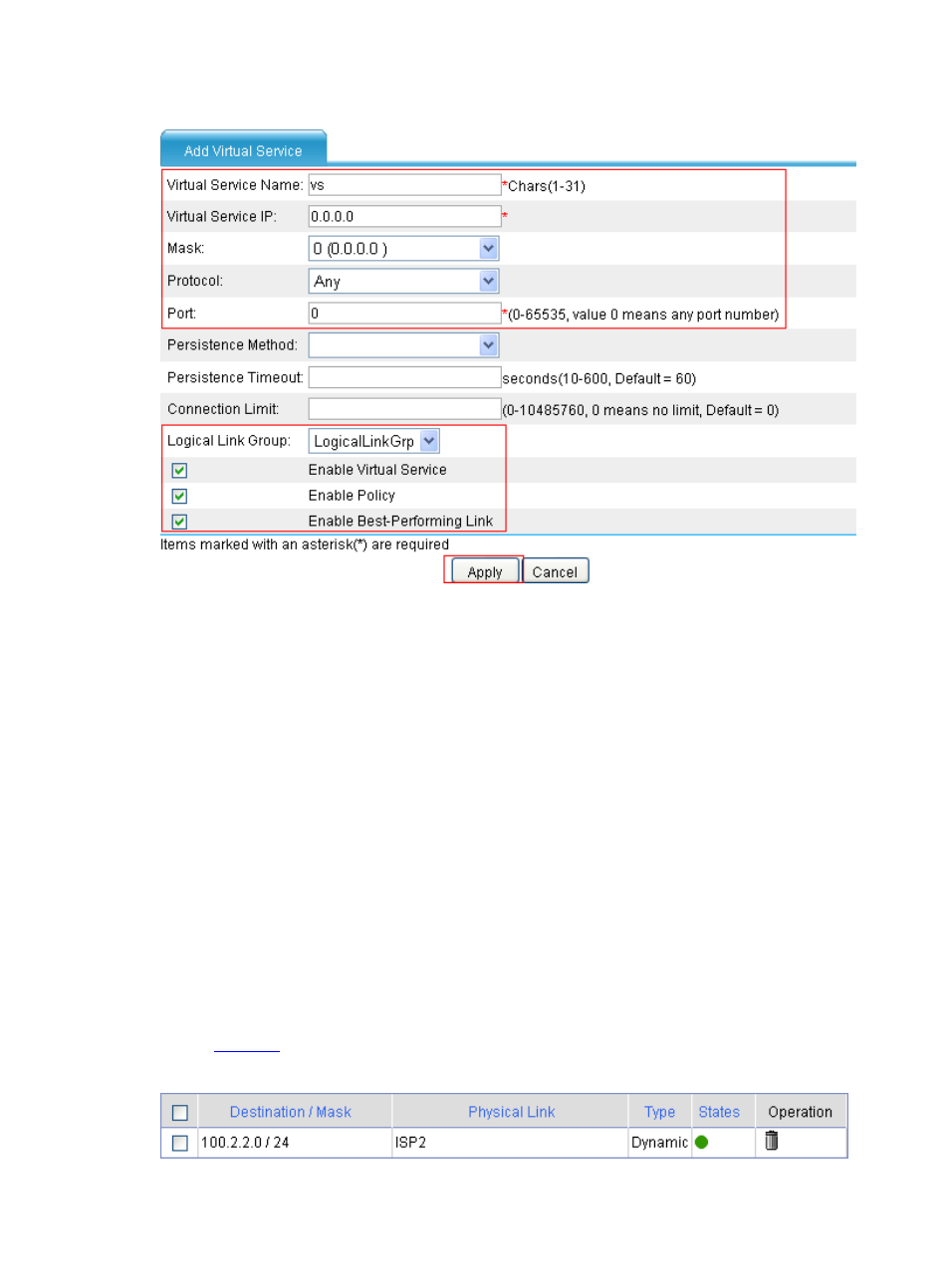
Figure 55 Create virtual service vs
•
Type the virtual service vs.
•
Type the virtual service address 0.0.0.0.
•
Select the mask 0 (0.0.0.0).
•
Select the protocol type Any.
•
Type the port number 0.
•
Select the logical link group LogicalLinkGrp.
•
Select the Enable Virtual Service check box.
•
Select the Enable Policy check box.
•
Select the Enable Best-Performing Link check box.
•
Click Apply.
Configuration verification
•
The intranet users send packets with the destination in the 100.2.2.0/24 segment to the extranet.
•
Select High Reliability > Load Balance > Link Load Balance > Best-Performing Link
from the navigation tree to enter the Best-Performing Link page.
•
You can view the dynamic best performing link entries in the best performance link table, as shown
in
.
Figure 56 Best performance link table