H3C Technologies H3C SecPath F1000-E User Manual
Page 797
23
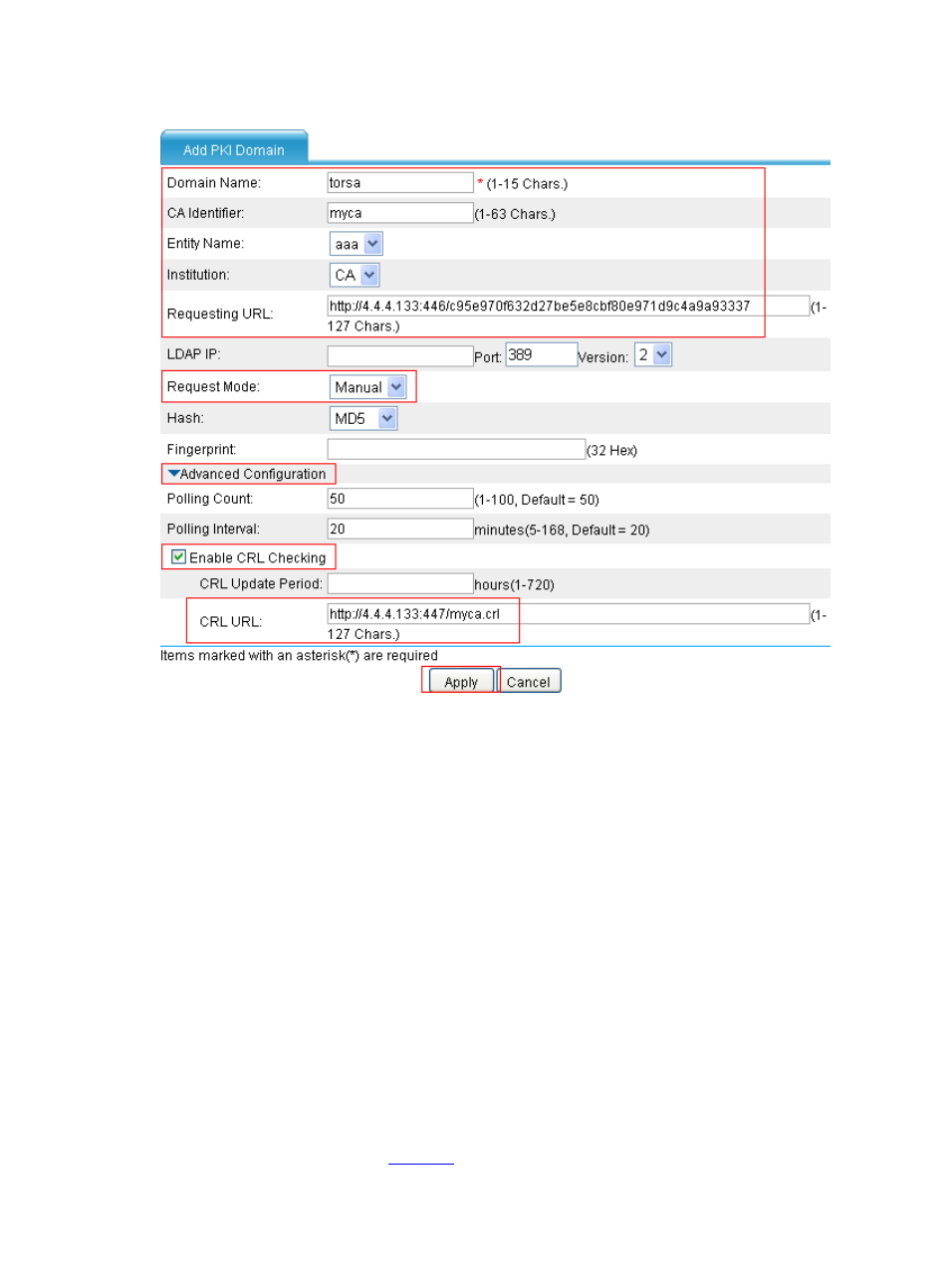
Figure 24 Add a PKI domain
•
Type torsa as the PKI domain name.
•
Type myca as the CA identifier.
•
Select aaa as the local entity.
•
Select CA as the authority for certificate request.
•
Type http://4.4.4.133:446/c95e970f632d27be5e8cbf80e971d9c4a9a93337 as
the URL for certificate request. The URL must be in the format of http://host:port/Issuing Jurisdiction
ID, where Issuing Jurisdiction ID is a hexadecimal string generated on the CA.
•
Select Manual as the certificate request mode.
•
Click the expansion button before Advanced Configuration to display the advanced
configuration items.
•
Select the Enable CRL Checking check box.
•
Type http://4.4.4.133:447/myca.crl as the CRL URL.
•
Click Apply. When the system displays “Fingerprint of the root certificate not specified. No root
certificate validation will occur. Continue?”, click OK to confirm.
# Generate an RSA key pair.
•
Select VPN > PKI > Certificate from the navigation tree and then click Create Key to perform
the configurations shown in
.