H3C Technologies H3C SecPath F1000-E User Manual
Page 762
16
•
Select mask 255.255.255.0.
•
Select Tunnel0 as the outbound interface.
•
Click Apply.
Step2
Configure Device B
# Configure an IPv4 address for each interface and assign the interfaces to security zones (omitted).
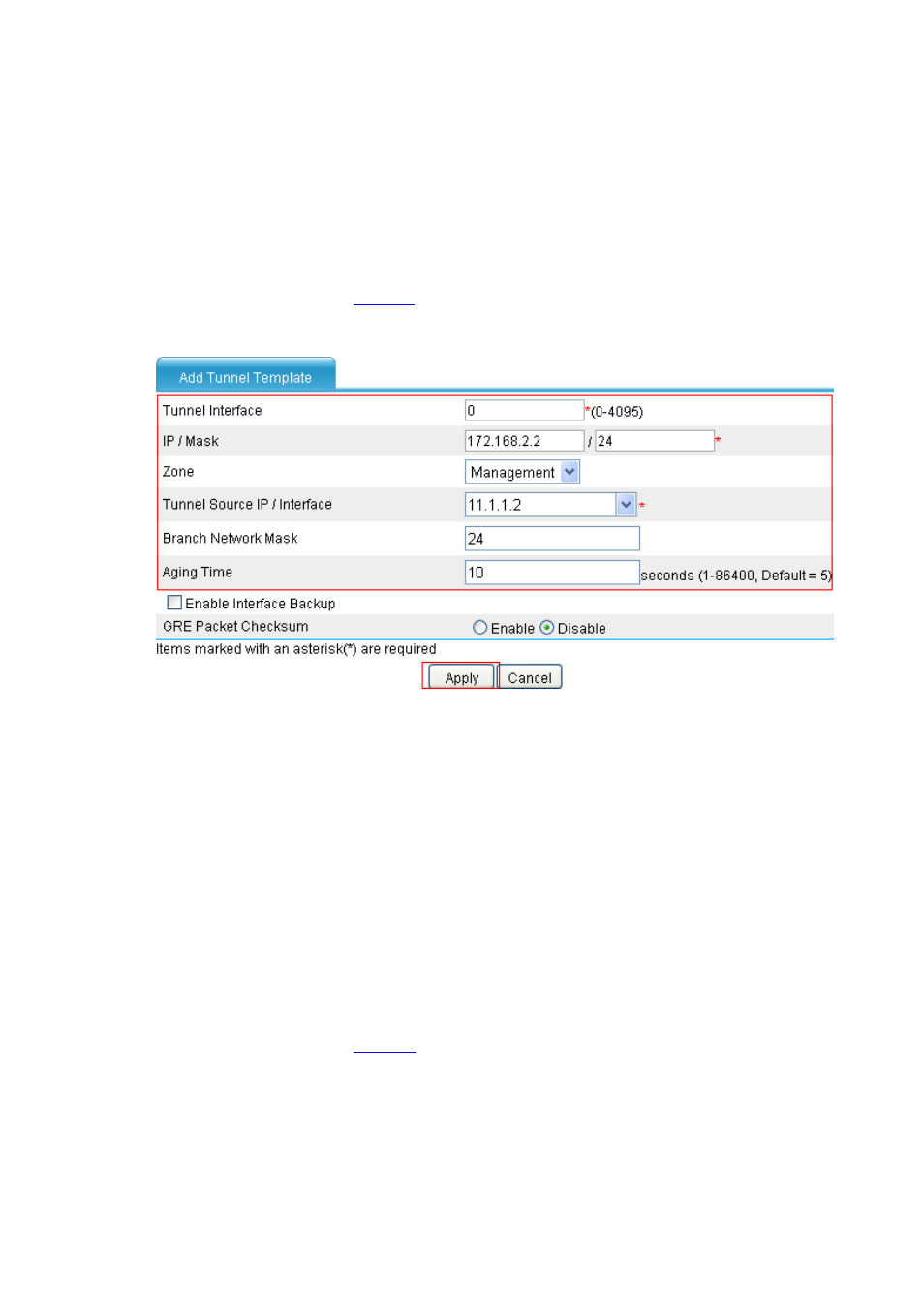
# Create a P2MP GRE tunnel interface, with the tunnel interface number being 0.
•
Select VPN > GRE > P2MP from the navigation tree and then click Add to perform the
configurations shown in
.
Figure 31 Add a P2MP GRE tunnel interface (Tunnel 0)
•
Type 0 in the Tunnel Interface text box.
•
Type IP address/mask 172.168.2.2/24.
•
Select Management from the Zone drop-down list. (Select a security zone according to your
network configuration.)
•
Type 11.1.1.2 as the tunnel source address.
•
Type 24 as the branch network address mask.
•
Type 10 as the tunnel entry aging time.
•
Click Apply.
# Create a GRE over IPv4 tunnel interface, with the tunnel interface number being 1.
•
Select VPN > GRE > GRE from the navigation tree and then click Add to perform the
configurations shown in
.