H3C Technologies H3C SecPath F1000-E User Manual
Page 537
29
•
Select Firewall > ACL from the navigation tree and then click Add. Perform configuration on the
page shown in
.
•
Type the ACL number 3002.
•
Click Apply.
•
Click the icon corresponding to ACL 3002 in the ACL list and click Add. Perform configuration
on the page shown in
.
•
Select Permit in the Operation drop-down list.
•
Select the Destination IP Address check box, and type IP address 192.168.0.3 and destination
wildcard 0.0.0.0.
•
Click Apply.
Step2
Configure classes
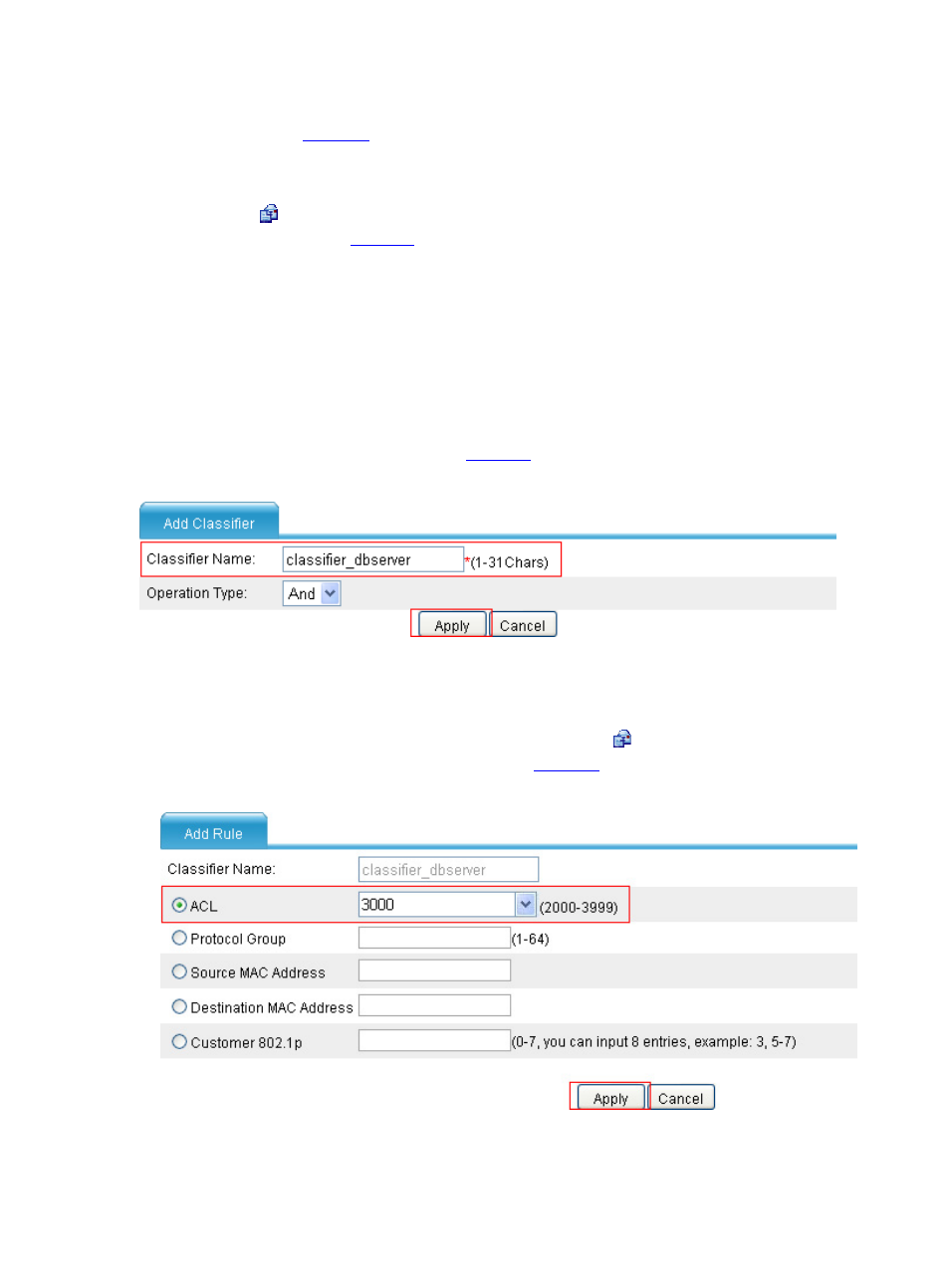
# Configure class classifier_dbserver to match packets based on ACL 3000.
•
Select Firewall > QoS > Classifier from the navigation tree and then click Add. Perform
configuration on the page as shown in
.
Figure 32 Create class classifier_dbserver
•
Type the class name classifier_dbserver.
•
Click Apply.
•
Select classifier_dbserver in the classifier list and click its icon. Click Create, and perform
configuration on the page on the page shown in
.
Figure 33 Configure rules for class classifier_dbserver
•
Select the ACL option and select ACL 3000.