H3C Technologies H3C SecPath F1000-E User Manual
Page 733
Advertising
21
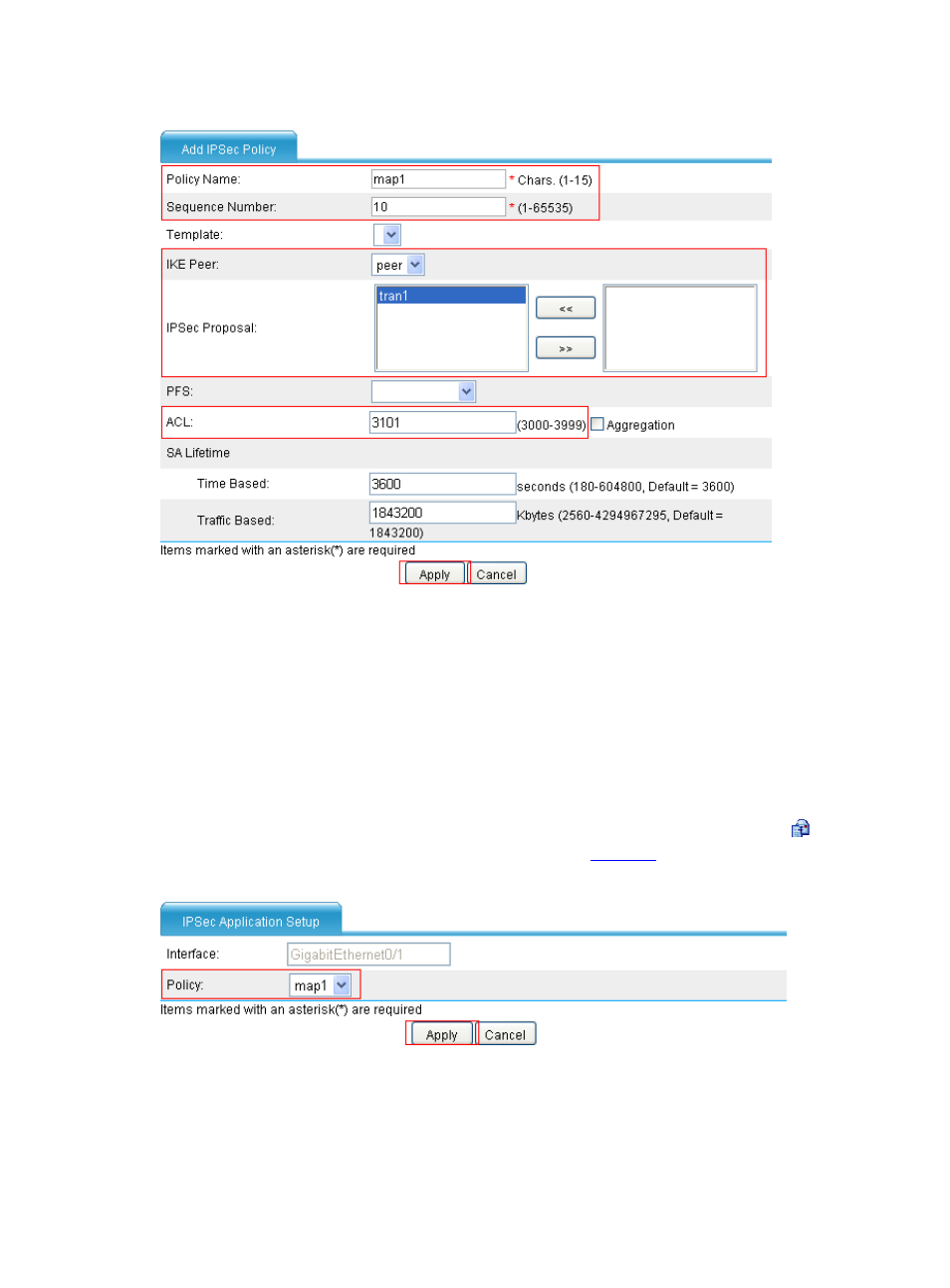
Figure 28 Configure an IPsec policy
•
Type map1 as the policy name.
•
Type 10 as the sequence number.
•
Select the IKE peer of peer.
•
Select the IPsec proposal of tran1 and click <<.
•
Type 3101 as the ACL.
•
Click Apply.
# Apply the IPsec policy to interface GigabitEthernet 0/1.
•
Select VPN > IPSec > IPSec Application from the navigation tree, and then click the icon of
interface Serial 2/1. Make the configuration as shown in
.
Figure 29 Apply IPsec policy to interface GigabitEthernet 0/1
•
Select the policy of map1.
•
Click Apply.
Step2
Configure Device B (The configuration steps on Device B are similar to those on Device A and thus the
configuration pages are omitted.)
Advertising
This manual is related to the following products: